
Computer Science Principles
Data Frames | Pandas | Intro 1
- Files To Get
- Pandas and DataFrames
- Cleaning Data
- Extracting Info
- Create your own DataFrame
- Example of larger data set
- APIs are a Source for Panda Data
Files To Get
-
Use wget or drag-and-drop the _notebooks/CSP/big-ideas/big-idea-2 folder for this and other ipynb on pandas.
-
Use wget or drag-and-drop, in a subfolder named data in your _notebookx to grab data files.
- data.csv
- grade.json
- Use wget or drag-and-drop, then copy image file and place into subfolder named data_structures in your images folder. Grab the entire folder.
Pandas and DataFrames
In this lesson we will be exploring data analysis using Pandas.
- College Board talks about ideas like
- Tools. “the ability to process data depends on users capabilities and their tools”
- Combining Data. “combine county data sets”
- Status on Data”determining the artist with the greatest attendance during a particular month”
- Data poses challenge. “the need to clean data”, “incomplete data”
-
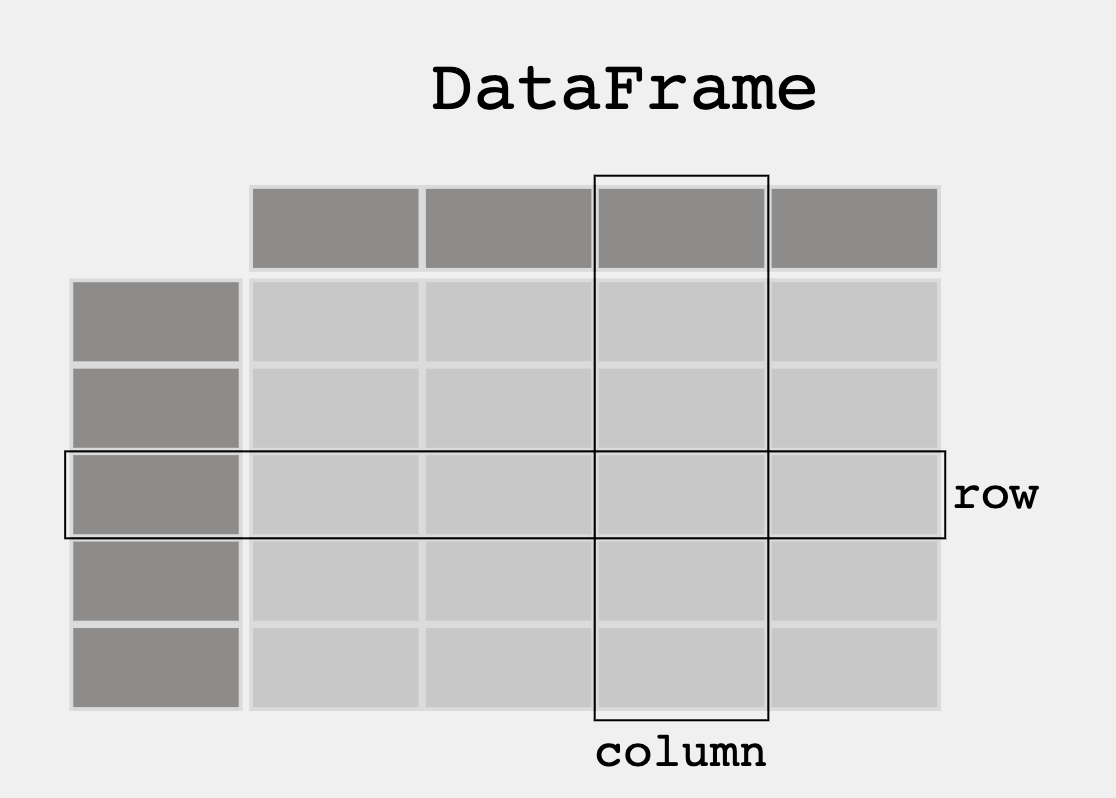
From Pandas Overview – When working with tabular data, such as data stored in spreadsheets or databases, pandas is the right tool for you. pandas will help you to explore, clean, and process your data. In pandas, a data table is called a DataFrame.
- DataFrame is a 2-dimensional labeled data structure with columns of potentially different types. It is similar to:
- a spreadsheet
- an SQL table
- a JSON object with rows [] with nexted key-values {}
# uncomment the following line to install the pandas library
#!pip install pathlib
# !pip install python-dotenv
# !pip install pandas
# !pip install requests

'''Pandas is used to gather data sets through its DataFrames implementation'''
# Top-level imports/config for this notebook
import os
from pathlib import Path

import pandas as pd
import requests
from dotenv import load_dotenv

# Stable path from home: ~/opencs/flask/.env
ENV_PATH = Path.home() / "opencs" / "flask" / ".env"
ENV_LOADED = load_dotenv(ENV_PATH)

print("cwd:", Path.cwd())
print("env path:", ENV_PATH)
print("env loaded:", ENV_LOADED)
Cleaning Data
When looking at a data set, check to see what data needs to be cleaned. Examples include:
- Missing Data Points
- Invalid Data
- Inaccurate Data
Run the following code to see what needs to be cleaned
# Read the JSON file and convert it to a Pandas DataFrame
# pd.read_json:  a method that reads a JSON and converts it to a DataFrame (df)
# df: a variable that holds the DataFrame
df = pd.read_json('data/grade.json')

# Print the DataFrame
print(df)

# Additional print statements to understand the DataFrame:
# print(df.info()) # prints a summary of the DataFrame, simmilar to database schema
# print(df.describe()) # prints statistics of the DataFrame
# print(df.head()) # prints the first 5 rows of the DataFrame
# print(df.tail()) # prints the last 5 rows of the DataFrame
# print(df.columns) # prints the columns of the DataFrame
# print(df.index) # prints the index of the DataFrame

# Questions:
# What part of the data set needs to be cleaned?
# From PBL learning, what is a good time to clean data?
# Could you hav Garbage in, Garbage out problem if you don't clean the data?
Extracting Info
Take a look at some features that the Pandas library has that extracts info from the dataset
DataFrame Extract Column
#print the values in the points column with column header
print(df[['GPA']])

print()

#try two columns and remove the index from print statement
print(df[['Student ID','GPA']].to_string(index=False))
DataFrame Sort
#sort values
print(df.sort_values(by=['GPA']))

print()

#sort the values in reverse order
print(df.sort_values(by=['GPA'], ascending=False))
DataFrame Selection or Filter
#print only values with a specific criteria
print(df[df.GPA > 3.00])
DataFrame Selection Max and Min
print(df[df.GPA == df.GPA.max()])
print()
print(df[df.GPA == df.GPA.min()])
Create your own DataFrame
Using Pandas allows you to create your own DataFrame in Python.
Python Dictionary to Pandas DataFrame
import pandas as pd

#the data can be stored as a python dictionary
dict = {
  "calories": [420, 380, 390],
  "duration": [50, 40, 45]
}
print("-------------Dictionary------------------")
print(dict)

#stores the data in a data frame
print("-------------Dict_to_DF------------------")
df = pd.DataFrame(dict)
print(df)

print("----------Dict_to_DF_labels--------------")
#or with the index argument, you can label rows.
df = pd.DataFrame(dict, index = ["day1", "day2", "day3"])
print(df)
Examine DataFrame Rows
print("-------Examine Selected Rows---------")
#use a list for multiple labels:
print(df.loc[["day1", "day3"]])

#refer to the row index:
print("--------Examine Single Row-----------")
print(df.loc["day1"])
Pandas DataFrame Information
#print info about the data set
print(df.info())
Example of larger data set
Pandas can read CSV and many other types of files, run the following code to see more features with a larger data set
import pandas as pd

#read csv and sort 'Duration' largest to smallest
df = pd.read_csv('data/data.csv').sort_values(by=['Duration'], ascending=False)

print("--Duration Top 10---------")
print(df.head(10))

print("--Duration Bottom 10------")
print(df.tail(10))
APIs are a Source for Panda Data
3rd Party APIs are a great source for creating Pandas Data Frames.
- Data can be fetched and resulting json can be placed into a Data Frame
- Observe output, this looks very similar to a Database
import os
from pathlib import Path
import pandas as pd
import requests
from dotenv import load_dotenv

def fetch():
    # notebook usually runs from repo root: /Users/johnmortensen/opencs/pages
    ENV_PATH = Path.home() / "opencs" / "flask" / ".env"
    loaded = load_dotenv(ENV_PATH)

    print("cwd:", Path.cwd())
    print("env loaded:", loaded, "from", ENV_PATH)

    uid = os.getenv("USER_UID")
    password = os.getenv("USER_PASSWORD")
    if not uid or not password:
        raise ValueError("Missing USER_UID or USER_PASSWORD in ../flask/.env")

    auth_url = "https://flask.opencodingsociety.com/api/authenticate"
    user_url = "https://flask.opencodingsociety.com/api/id"

    with requests.Session() as session:
        auth_payload = {"uid": uid, "password": password}
        auth_resp = session.post(auth_url, json=auth_payload, timeout=15)

        print("auth status:", auth_resp.status_code)
        print("auth body:", auth_resp.text[:300])
        auth_resp.raise_for_status()

        resp = session.get(user_url, timeout=15)
        print("user status:", resp.status_code)
        print("user body:", resp.text[:300])
        resp.raise_for_status()

        data = resp.json()

    df = pd.DataFrame(data.get("personas", []))
    print(df)

fetch()
import os
import time
from pathlib import Path
import builtins as _b

import pandas as pd
import requests
from dotenv import load_dotenv
from requests.adapters import HTTPAdapter
from urllib3.util.retry import Retry

def fetch_all_users(per_page=50, max_pages=100, delay_sec=0.2):
    env_path = Path.home() / "opencs" / "flask" / ".env"
    loaded = load_dotenv(env_path, override=True)
    print("path:", env_path)
    print("env loaded:", loaded, "from", env_path)

    uid = os.getenv("USER_UID")
    password = os.getenv("USER_PASSWORD")
    if not uid or not password:
        raise ValueError("Missing USER_UID or USER_PASSWORD in ~/opencs/flask/.env")

    auth_url = "https://flask.opencodingsociety.com/api/authenticate"
    user_url = "https://flask.opencodingsociety.com/api/user"

    def extract_rows(payload):
        if isinstance(payload, _b.list):
            return payload
        if isinstance(payload, _b.dict):
            return payload.get("users") or payload.get("personas") or payload.get("items") or []
        return []

    all_rows = []

    with requests.Session() as session:
        retry = Retry(
            total=3,
            connect=3,
            read=3,
            backoff_factor=0.6,
            status_forcelist=[429, 500, 502, 503, 504],
            allowed_methods=["GET", "POST"],
        )
        adapter = HTTPAdapter(max_retries=retry)
        session.mount("https://", adapter)
        session.mount("http://", adapter)

        auth_resp = session.post(
            auth_url,
            json={"uid": uid, "password": password},
            timeout=(5, 20),
        )
        print("auth status:", auth_resp.status_code)
        print("auth body:", auth_resp.text[:200])
        auth_resp.raise_for_status()

        # Optional bearer support
        if "application/json" in auth_resp.headers.get("content-type", ""):
            auth_json = auth_resp.json()
            token = auth_json.get("token") or auth_json.get("jwt") or auth_json.get("access_token")
            if token:
                session.headers.update({"Authorization": f"Bearer {token}"})

        for page in range(1, max_pages + 1):
            resp = session.get(
                user_url,
                params={"page": page, "per_page": per_page},
                timeout=(5, 30),
            )
            print(f"page {page} status:", resp.status_code)
            if resp.status_code == 401:
                raise PermissionError("401 on users endpoint. User role/token required.")
            resp.raise_for_status()

            data = resp.json()
            rows = extract_rows(data)

            if not rows:
                print(f"page {page}: empty, stopping.")
                break

            all_rows.extend(rows)
            print(f"page {page}: +{len(rows)} rows (total {len(all_rows)})")

            # stop when last page is smaller than per_page
            if len(rows) < per_page:
                print(f"page {page}: partial page, stopping.")
                break

            time.sleep(delay_sec)

    df = pd.DataFrame(all_rows)

    # keep only rows with persona data
    df = df.loc[
        df["personas"].apply(lambda p: isinstance(p, list) and len(p) > 0),
        ["uid", "name", "personas"]
    ].head(100)

    print("final rows (personas only, max 50):", len(df))
    display(df)
    return df

all_users_df = fetch_all_users(per_page=50)
Popcorn Hacks
Portfolio Building
- Add this Blog and other blogs to you own Blogging site.
- Have all lecture files saved to your files directory before Tech Talk starts.
- Add this Blog to you own Blogging site. In the Blog add notes and observations on each code cell.
The next 6 weeks, the Teachers want you to improve your understanding of data structures and data science. Your intention is to find some things to differentiate your individual College Board project, particularly if your project looks like all other projects.
- Look at this blog and others on data structures for todays date.
- Create or Find your own dataset. The suggestion is to use a JSON file, integrating with your CPT/PBL project would be Amazing.
- Build frontend to backend to filter or use your data set in your CPT/PBL.
- When choosing a data set, think about the following…
- Does it have a good sample size?
- Is there bias in the data?
- Does the data set need to be cleaned?
- What is the purpose of the data set?
- …